a tour of our new event submission form
If you are someone who organizes jazz events in Calgary, our event submission form has gone through a serious overhaul.

This post is part of our series of account walkthroughs for the new JazzYYC website. Here, we’ll walk through the event submission form field by field, so you know what each one does and how to get your event looking its best on our calendar.
New this time: you’ll need to be logged in to submit an event. Submitting now lets you own your events, so you can edit or cancel them from your own event dashboard. If you had an account on the old website, your login has been carried over. If you don’t remember your password, a simple “forgot password” will help you retrieve it.
With the launch of our new website, we put a lot of thought into our calendar and how events are displayed. All community events start with the submission form, and our goal is to make it as user-friendly as possible. A good form asks the right questions and turns the answers into an easy-to-navigate event page that gives attendees what they need to choose their evening.
Community-submitted or “jazz around town” events are paramount to the success of JazzYYC. While we promote and organize our own festivals, events and fundraisers, we put a high priority on growing a healthy jazz scene in Calgary, which benefits the jazz community as a whole.
Event information
The fields in the event information section are fairly standard, with a few caveats.
Subtitle
The subtitle is there to reduce long-winded titles. If you can break your title into two parts, it’s easier on the eyes. You can do what you want, but we suggest using the band name as the subtitle and the event series as the main event title, or vice versa.
Description
Band or band member bios and blurbs about the event are ideal. Avoid including information that’s already covered in other fields, such as venue/address, times, band members, ticket links or social media links. There’s no need to repeat it, and as part of the approval process, we will edit it out if we see it.
Discovery tags
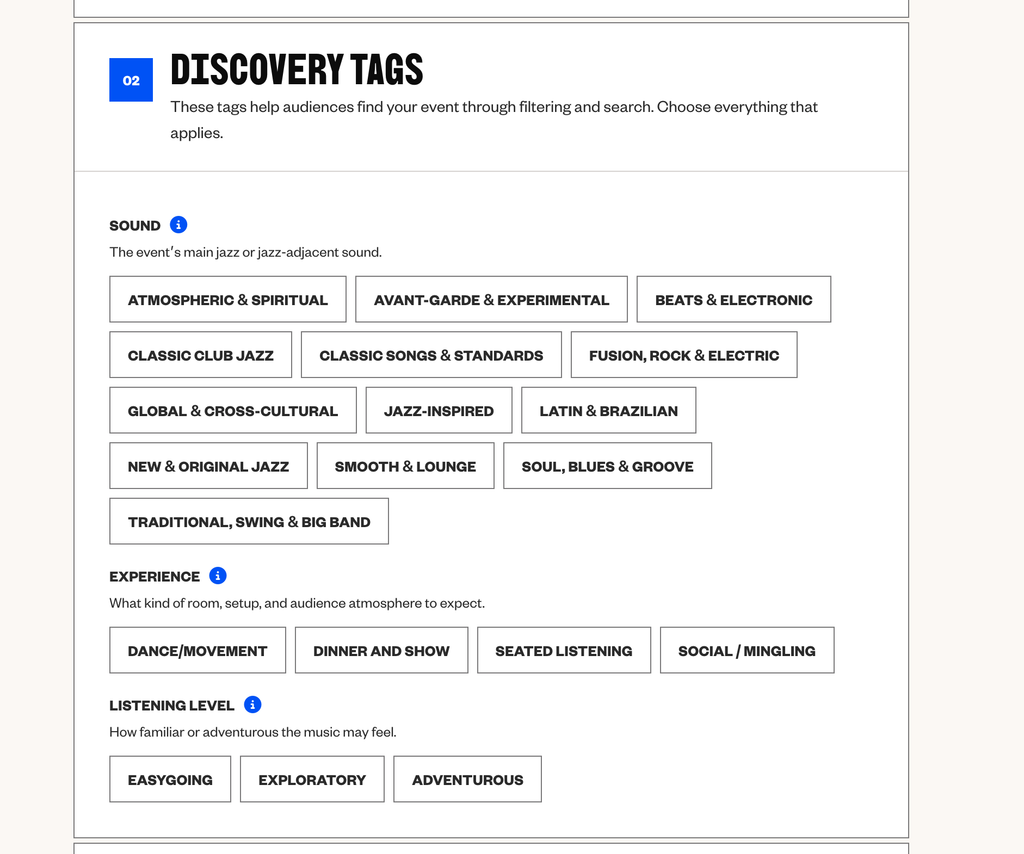
Discovery tags guide potential attendees searching our calendar to the event that’s right for them. There are three types: Sound, Experience and Listening Level.
Sound
This is all about the sub-genre of jazz your event has booked. We’ve categorized them into 13 styles and permit up to two per event.
- Traditional, Swing & Big Band: Early jazz, swing, big band, and traditional ensemble sounds.
- Classic Songs & Standards: Standards, songbook material, vocal jazz, or familiar songs reinterpreted.
- Atmospheric & Spiritual: Modal, meditative, spiritual, ambient, or mood-driven jazz.
- Soul, Blues & Groove: Jazz rooted in blues, soul, funk, gospel, R&B, or groove.
- Beats & Electronic: Jazz shaped by hip-hop, beats, DJs, sampling, or electronic production.
- New & Original Jazz: Contemporary jazz built around original music, new arrangements, or emerging voices.
- Global & Cross-Cultural: Jazz blended with traditions, instruments, rhythms, or influences from around the world.
- Classic Club Jazz: Small-group bebop, hard bop, straight-ahead, and acoustic club jazz.
- Latin & Brazilian: Afro-Cuban, Latin, Brazilian, salsa, samba, bossa nova, and related rhythms.
- Fusion, Rock & Electric: Electric, amplified, rock-influenced, or fusion-driven jazz.
- Smooth & Lounge: Polished, relaxed, intimate, or lounge-oriented jazz.
- Avant-Garde & Experimental:Free improvisation, unconventional forms, noise, extended techniques, or boundary-pushing performance.
- Jazz-Inspired: Not exactly jazz, but inspired by jazz. It could have more of a blues, or electronic focus, but could arguably fall under the jazz umbrella.
Experience
The type of event: what kind of room, setup and audience atmosphere to expect. The options are:
- Social / Mingling: Casual and lively event for mixing and mingling
- Seated Listening: Performance-focused, seated concert event
- Dance/Movement: High-energy event, built for dancing and standing
- Dinner and show: Seated event with food and drink service.
Listening Level
How familiar or adventurous the music may feel.
- Easygoing: For jazz newcomers and casual listeners Familiar melodies, grooves, and song-based jazz.
- Exploratory: For seasoned listeners. Richer arrangements, extended solos, and rhythmic shifts.
- Adventurous: For seasoned listeners seeking bold, unfamiliar sounds. Abstract, experimental, highly improvised, or textural.
Dates and times
This could be a simple one-off event or an event series that spans multiple days over a certain period of time. If it’s a one-off, simply add the date, start/end time and door time.
If your event falls on multiple dates, we’ve got you covered. First, add the first date of your event. Then, under “event recurrence,” choose what type of series it is.
- Daily: Repeat every # of consecutive days until the event series if over.
- Weekly: Repeat every # of weeks on a given day until the series is over. (eg. Every 2nd Tuesday until October 27th)
- Monthly: For events that happen once a month. It can fall on the same date every month (October 1st, November 1st, etc.) until an end date, or on the first, second, third or fourth occurrence of a given weekday each month (e.g. every 2nd Sunday of the month).
- Yearly: Not as common, but if you throw an event every Valentines day, you can have a recurring event for this.
- Custom dates: Adds custom dates for your event that don’t follow any of the above patterns.
- Custom weeks: Similar to weekly, but you can add multiple days of the week. (eg. Every Monday/Tuesday for the next 3 weeks)
Tickets, Contact info and Socials
Selling tickets on a different website? Need to add the event’s contact info? Want to promote your event or band’s social media accounts? Embed YouTube, Spotify or SoundCloud? We’ve got you covered here.
Event Featured Image
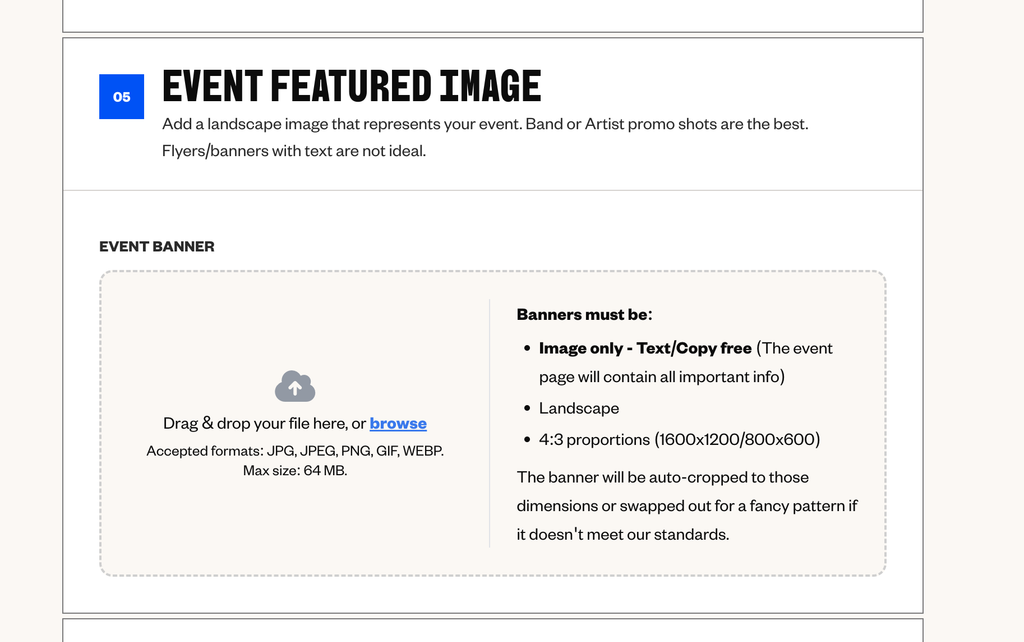
Our event template uses specific image dimensions, and featured images look best if they follow them. If you add a portrait-oriented image, it will be cropped in the middle, which could very well result in showing off your band’s midriff or a close-up of part of a person’s face.
Images are automatically cropped to 4:3 landscape proportions (1600 x 1200 pixels). If you upload a landscape image with no text, it will be cropped from the centre, so don’t worry about using Photoshop to crop it yourself if you don’t have to.
Text is also discouraged. All the information for your event will be displayed in the copy itself, so there’s no need to use a flyer to show event details. Text also gets really small on our calendar thumbnails, which isn’t very inviting.
No event image? That’s okay! We have a dozen or more custom patterns that fit our brand, and they’re randomly generated and look great.
Venue / Organizer details
Venues are mandatory. If your event’s venue isn’t yet in our database, you can easily add it. If you submit a venue, you have control over its details. If you’re a venue owner and would like control over your venue’s details, send us an email and we can transfer it to your account.
adding an Organizer is not mandatory, but it’s important.
If you organize events, you can have your own organizer page that shows all your current and past events in one place.
Add yourself as an organizer while submitting your first event, as events submitted prior won’t be automatically added to your organizer page (although you can add them in the events dashboard, which will be covered in another post).
All venues and all organizers have their own pages that show their current and past events. Organizer page links can be found in your organizer dashboard, and venues you manage have their own venue dashboard.
Submit/Preview
Before submitting, you can preview your event. Click “Edit event” if you need to go back and make changes.
Submitting the event will notify our event admins, and we will approve it within 1–3 days. When it’s approved, you’ll get a notification. After approval, you’ll be able to make updates in your events dashboard. Stay tuned for an in-depth tour of the admin area.